
What is CI/CD pipeline
A continuous integration/continuous delivery pipeline gives you the ability to automate each phase of your software delivery process, by managing code builds, automating code quality- tests, keeping infrastructure consistent and deploying to an application development or production environments. Automated pipelines remove human errors, provide standardized development feedback loops and enable fast product iterations.
Once the CI/CD pipeline has been configured every time developer changes the applications source code, the application is built and tested automatically. As customer satisfaction has become the main focus for many software vendors the ability to rapidly release new features and stable updates
There are a vast range of CI/CD products available that you can use to create a CI/CD pipeline. Product selection will vary based on your use case and regulatory requirements. For example Circle CI and Codeshipand Travis CI are market leading cloud based CI SaaS tools. Jenkins is an example of a self-hosted CI tool which can be used if you are required to use your own datacentre resources. If you are currently going through the on premise to cloud transition Circle Ci is a good choice of tool as Circle ci do offer a self-hosted version of their product.
Benefits of a ci/cd pipeline
- You can make smaller code changes which are less likely to have unintended consequences.
- A reduced mean time to resolution (MTTR) as fault identification and correction is a much quicker process.
- Testing small blocks of code improves the overall accuracy of the test.
- Avoid down time by identifying issues before they are allowed to be implemented in the production environment.
- Improve a product rapidly by introducing new features based on customer feedback
- Feature flags and blue-green deployments enable seamless introduction of new product features, as well as giving you the ability to roll back to a previous state very easily.
Components of a CI/CD pipeline

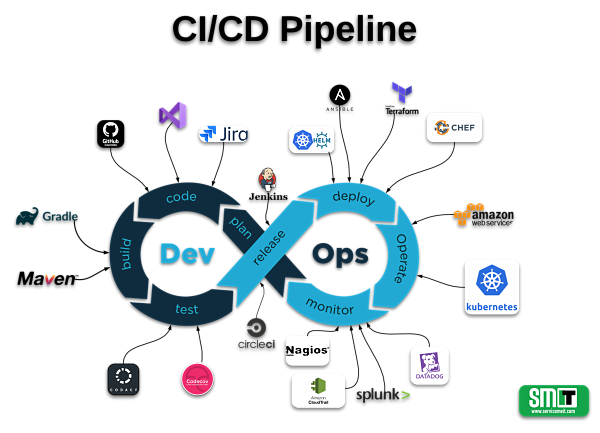
Figure 1 : DevOps Lifecycle
CI/CD tools give you the ability to orchestrate and automate each stage of the dev ops cycle.
Figure 1 displays some of the tools which can be used to create fully automated CI/CD pipeline. In this section we will explore the different components of the CI/CD pipeline.
Integrated development environment (IDE)
An IDE is a single application that combines development actives such as writing source code, debugging and building application packages. Visual studio and intellij idea are popular IDE’s which are used my programmers to develop application in various languages. Both IDE’s allow you to customise the development environment using third party plug-ins. For example, a terraform plug-in will give the IDE additional features such as formatting and auto suggestion for terraform syntax.
XCode is an IDE for Apple developers. It includes all of the features you would expect an IDE to have but it is used for MacOS, IOS, IPadOS and watchOS development. Market leading IDE’s easily integrate with code repository / version control software such as GitHub.
GitHub
Git is a version control tool use by developers to track changes in source code. GitHub is a code hosting platform for version control and collaboration. GitHub allows developers to create code repository’s that can be accessed from any location.One of GitHub’s most useful features is branching, you can work on different version of a repository at any time without effect the master source code. We like to use the concept of master and feature branches. We create a new branch for every new feature we would like to introduce.The Feature Branch concept: New feature development should take place in a dedicated feature branch instead of the master branch. This separation allows multiple developers to work on a particular feature without updating the master codebase for the application
When you create a new feature branch you are effectively taking a point in time snap shot of the master branch which you can then edit locally and commit once you have made the necessary change.

Figure: 2
Pull requests enable effective developer collaboration by allowing code to be reviewed before it is merged back into the master branch. Once you are happy with the code in the feature branch you can open a pull request, have you code peer review and then merge the code into the master branch.
Circle CI
CircleCI is Continuous Integration tool that allows developers build, test and deploy applications on various platforms. Once you authorize a GitHub repository and add it to circle ci every code change triggers a workflow. This workflow automates tests in a clean container. CircleCI runs each job in a separate container. CircleCI then sends an email notification of success or failure after the tests complete.
CircleCI may be configured to deploy code to multiple environments, such as AWS, Google Kubernetes Engine (GKE), Microsoft Azure, and Heroku. Custom cloud service deployments are easily scripted using SSH or by installing the API client of the service with your job configuration.
Codacy
Codacy is an automated code analysis/quality tool that provides developers with static analysis, cyclomatic complexity, duplication and code unit test coverage changes in every commit and pull request.
Codacy is used to enforce your code quality standard and save time in code reviews, enforce security best practices. Once integrated with GitHub repositories you can analysis the quality of every pull request inside GitHub.
Codecov
During the process of writing unit tests, a developer will discover new bugs or syntax issues in the source code need to be resolved before releasing the application. Codecov delivers or “injects” coverage metrics directly into the modern workflow to promote more code coverage.
Docker Hub
Docker Hub is a service provided by Docker for finding and sharing container images with your team. Docker hub allows you to create repositories to docker container images. Services such as kubernetes can pull an image from docker hub and use it to create containers
Kubernetes and Helm
Kubernetes is an open-source platform for managing containerized workloads and services, that facilitates both declarative configuration and automation. It has a rapidly growing ecosystem, all major PaaS providers have now integrated kubernetes into their offering in some form.
Helm is a tool for managing Kubernetes charts. Charts are packages of pre-configured Kubernetes resources.
Use Helm to:
- Find and use popular software packaged as Helm charts to run in Kubernetes
- Share your own applications as Helm charts
- Create reproducible builds of your Kubernetes applications
- Intelligently manage your Kubernetes manifest files
- Manage releases of Helm packages
Terraform
Hash Corp’s Terraform is a tool for building, changing, and versioning infrastructure safely and efficiently. Terraform can manage existing and popular service providers as well as custom in-house solutions.
Configuration files describe to Terraform the components needed to run a single application or your entire datacentre. Terraform generates an execution plan describing what it will do to reach the desired state, and then executes it to build the described infrastructure. As the configuration changes, Terraform is able to determine what changed and create incremental execution plans which can be applied.
The infrastructure Terraform can manage includes low-level components such as compute instances, storage, and networking, as well as high-level components such as DNS entries, SaaS features, etc.
Vault
HashiCorp’s Vault is a tool for securely accessing secrets. A secret is anything that you want to tightly control access to, such as API keys, passwords, or certificates. Vault provides a unified interface to any secret, while providing tight access control and recording a detailed audit log.
A modern system requires access to a multitude of secrets: database credentials, API keys for external services, credentials for service-oriented architecture communication, etc. Understanding who is accessing what secrets is already very difficult and platform-specific. Adding on key rolling, secure storage, and detailed audit logs is almost impossible without a custom solution. This is where Vault steps in.
Example CI/CD pipeline